Features

Everything AdMaster does, on one page

Check every feature before you try it: traffic scheduling, traffic logs, reconciliation, reports and billing for radio and TV stations. Every feature is included in the price of each station licence, with unlimited users.

60 days free, with no credit card. Try every feature with real spots on air.
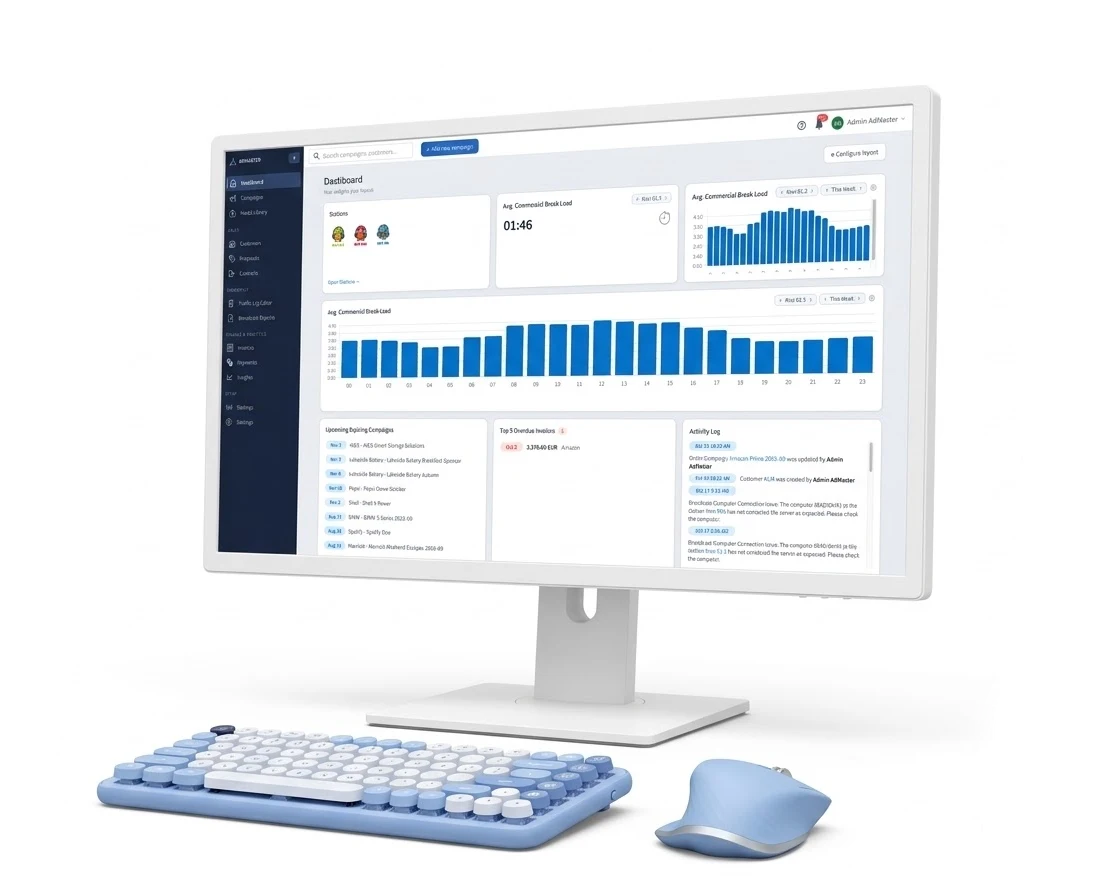
The AdMaster dashboard on a monitor: stations, average commercial break load by hour, expiring campaigns, overdue invoices and the activity log

Why stations choose AdMaster

AI assistants (beta)

Do all your traffic in your own words.

AdMaster AI assistant: a campaign request in plain words and the preview before it is saved

Scheduling

You set the rules. AdMaster does the math.

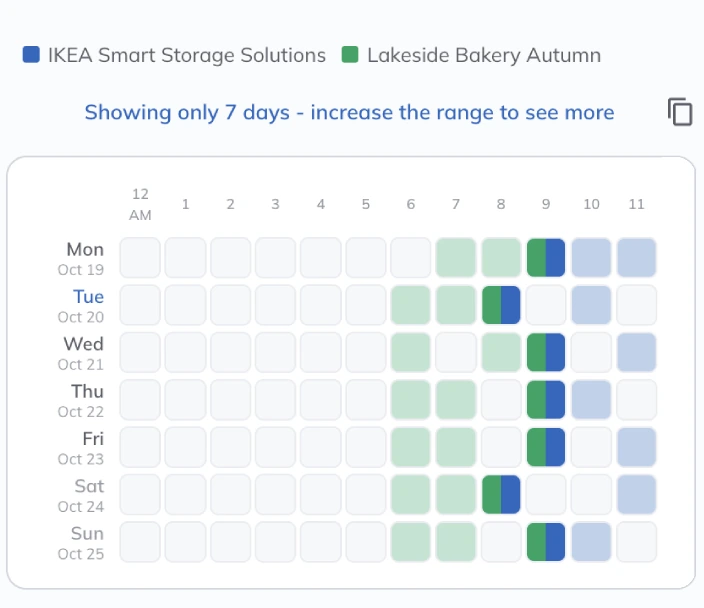
Campaign distribution in AdMaster: the plays of two campaigns by hour, from Monday to Sunday

Traffic logs

Ready for more than 40 playouts.

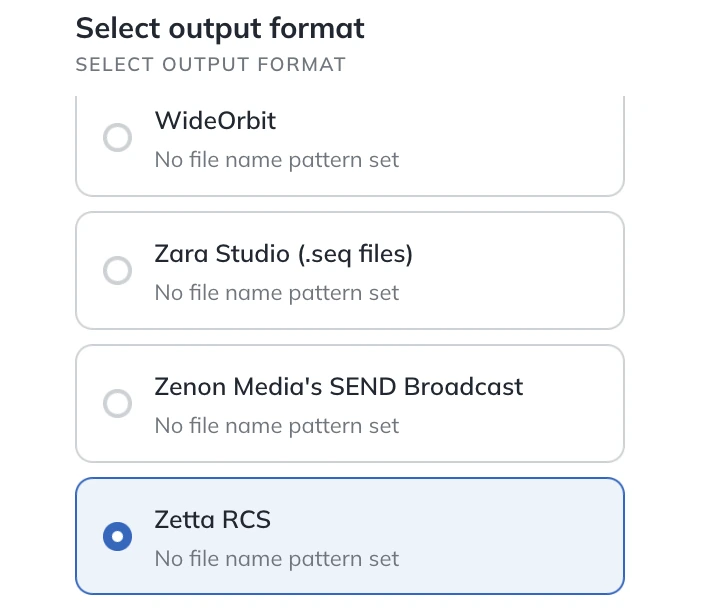
Select output format in AdMaster: a list of traffic log formats for playouts, with one selected

Station networks and split ads

Every station, from one account.

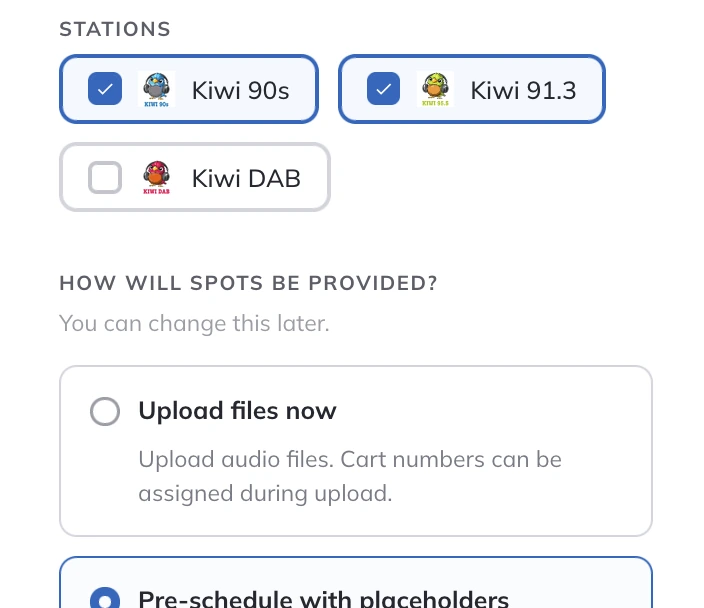
Stations for a new campaign in AdMaster: two of three stations ticked, and how the spots will be provided

Reconciliation

Know what aired, spot by spot.

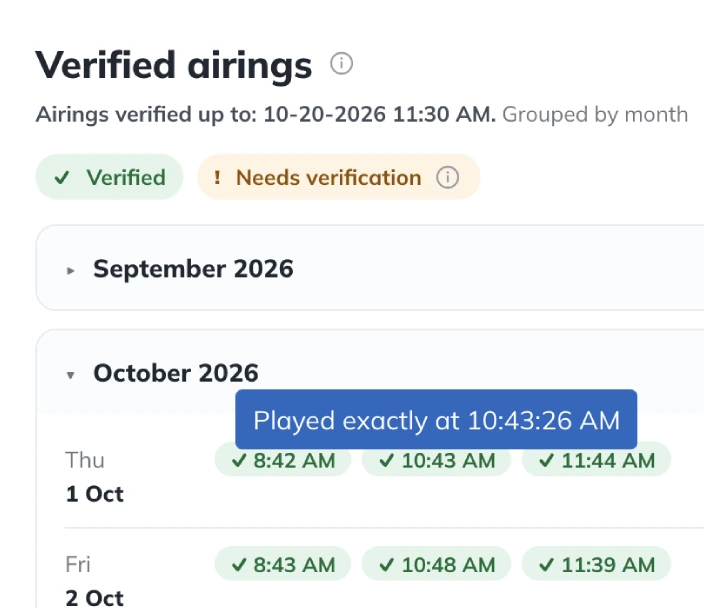
Verified airings: every airing found in the broadcast log, grouped by month, with the exact time each spot played

Live campaign pages

Proof of performance, in real time.

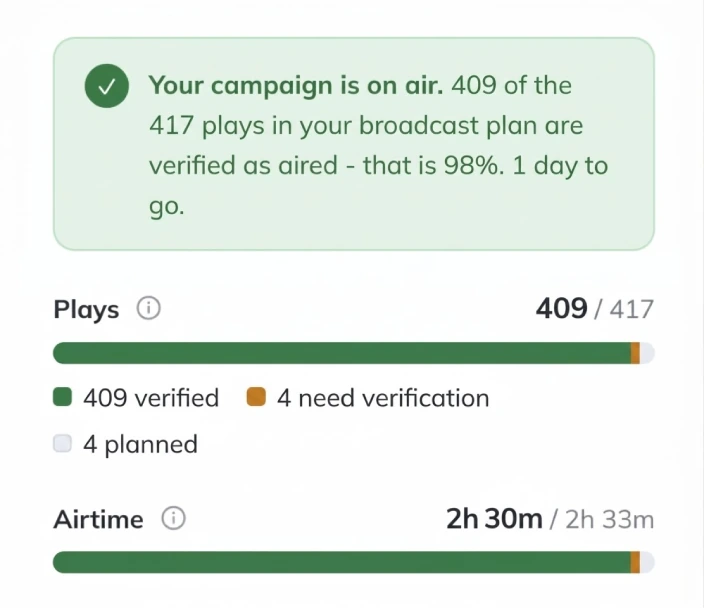
Live report for the advertiser: the campaign is on air, 409 of 417 plays verified as aired, with the plays and the airtime

Billing

Sold. Scheduled. Aired. Billed.

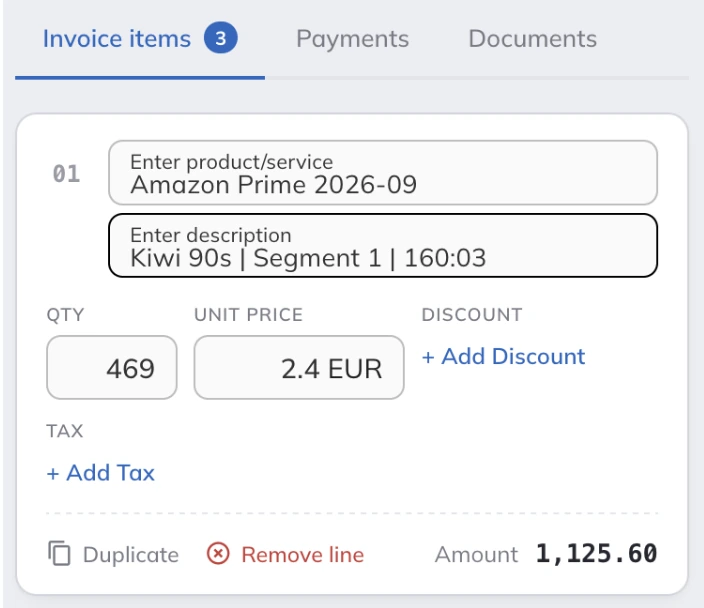
Invoice items in AdMaster: one line for each station, with quantity, unit price and amount

Every feature is included in the price: EUR 29.95 per station per month, or EUR 299.40 per year. See pricing

AI assistants Beta

Tell your AI assistant what you need, in your own words. AdMaster does the work, by its own rules. Beta. AI can make mistakes. Always have a person check everything your AI assistant does.

How AI assistants work
  • A campaign from your own words, or from the client's email or order
  • Changes to many campaigns in one message
  • Station off air? The missed plays back in every campaign, in one message
  • Reports from your Insights data, in your own words
  • Broadcast reports and invoices for a whole month, in one message
  • A preview of everything before it is saved
  • The same permissions as your AdMaster user
  • Any AI tool that supports custom connectors (MCP)
  • Included in every station licence

Scheduling

Enter the campaign once. AdMaster places every spot within the settings of each campaign.

How scheduling works
  • Static, variable and manual schedules
  • One campaign, in as many parts as you need, each with its own dates, hours and plays
  • Plays per day, or for a whole week, weekend, month or any dates you choose
  • Plays split by day of the week
  • Repeat a pattern every second day, every third week or at any other interval
  • Spots spread evenly across the hours you sold
  • The same commercial time in every break of the hour
  • Competitors kept apart, by the business categories you set
  • Spots with the same voice kept apart
  • Exact breaks, or first, last, upper third, middle or lower third of the break
  • Reminder spots: two or more spots from one campaign in the same break
  • A spot never leaves the days and hours in its campaign
  • Plays with no room stay unscheduled, and you see them right away
  • Less than 3 minutes for a campaign of average complexity

Commercial breaks

Set up your breaks once for each station. AdMaster keeps every break the length you need.

How breaks work
  • Up to 20 breaks an hour
  • Different clocks for each day of the week
  • A starting minute and a maximum length for each break
  • A clock library: share one set of clocks between stations, or copy it
  • Special clocks for any dates, with an automatic return to the regular clocks
  • Top-ups bring every break to the exact length you need
  • Top-ups from your own files and from spots in active campaigns
  • Your own jingles in the breaks

Spots and campaigns

Everything an order needs, in one campaign.

How campaigns work
  • One campaign on one station, or on many
  • More than one spot in a campaign, in rotation
  • Placeholders for spots that have not arrived yet
  • Reuse a spot from an earlier campaign, straight from your Media Library
  • Pause a campaign on one station and keep it on air on the others
  • A customer needs just a name and a type of business
  • Business categories you can change to fit your market
  • Contracted, scheduled and aired plays, seconds and value for every campaign
  • Warnings on your dashboard when something needs your attention

Traffic logs and playout

AdMaster writes the traffic log your playout reads, and delivers it together with the spot files.

See all playout systems
  • Traffic logs for more than 40 radio and TV playouts
  • A log for every break, every hour or every day, as your playout expects
  • For playouts that merge the log into the playlist, and for playouts that load each break when it plays
  • A new traffic log after every change to a campaign, spot or break
  • On air in the next hour, if your playout loads new traffic logs every hour
  • The AdMaster Desktop Client app delivers traffic logs and spot files to the playout computer
  • A calendar of every day's traffic log: when it was created, sent and downloaded by the station
  • Delivery to another computer in your network, or to any folder your playout reads
  • 1 GB of storage for spot files with every station licence
  • A printable traffic log with the columns you choose
  • Traffic Log Editor for the rare changes by hand
  • An email when something goes wrong on a station

Reconciliation

AdMaster compares the schedule with the broadcast log your playout writes, spot by spot.

How reconciliation works
  • Reads the broadcast log your playout writes, by spot name, file name or cart number
  • Automatic: the AdMaster Desktop Client app sends the broadcast log several times an hour
  • Manual: upload the broadcast log for any past date
  • Real time, when your playout updates its broadcast log as it plays
  • A green check for every spot that aired
  • Every order that fell short, in one list
  • A warning email when a spot did not air, in automatic mode
  • Confirm a play by hand
  • Add a missed spot to a later break, by hand
  • Station off air? Your AI assistant replaces the missed plays in every campaign (beta)

Reports

Proof of performance for your advertisers, and answers for your team.

How reports work
  • Live reports for your advertisers: the broadcast plan and every verified airing
  • A private link or a PDF, sent by email from AdMaster, with no account and no app
  • One live report for a campaign on many stations
  • Broadcast reports, also called as-run reports, affidavits or proof of performance
  • The time of every play, or the scheduled times
  • Any customer and any period, in one list or by campaign
  • Your logo, address and certification statement on the PDF
  • Send it as a PDF or a link, or export it to CSV
  • Turn a broadcast report into an invoice
  • Insights: build your own reports on delivery, sales and your team
  • Save your Insights reports and export them to CSV
  • Ask your AI assistant for a report in your own words (beta)

Billing

Invoice the whole of last month in one go. Proposals, contracts and invoices come from the same campaign, when you need them.

How billing works
  • Billing runs: every campaign of last month invoiced and emailed in one go, with a broadcast report attached if you want
  • Or one message to your AI assistant: "Create the invoices for last month." (beta)
  • Proposals as a PDF with your logo and a valid-until date
  • Turn a proposal into a contract
  • Proposals and contracts signed online from a link, with the signed PDF sent to the client by email
  • Contracts with contracted, scheduled and aired plays for every item
  • A price for each part of the campaign: per play, per second, per day, per week, per month or a flat fee
  • Invoices from the spots that aired, from the spots you planned, or line by line
  • Production, sponsorships, web advertising and anything else you sell, on the same invoice
  • Discounts per line, per invoice, per agency and per customer
  • Your currency, your taxes and your numbering
  • Send invoices to your customers from AdMaster
  • Record payments and see which invoices are paid, partly paid or overdue
  • Export invoices to CSV, JSON or XML for your accounting software
  • 4As electronic invoices for agencies in the US

Station networks

Every station, channel and frequency in one account.

How networks and split ads work
  • One account for all your stations, channels and frequencies
  • One campaign on many stations, with the same or a different schedule on each
  • Different spots on different stations, in the same campaign
  • Every station with its own local time and its own breaks
  • Split ads with breaks of the same length on every station or frequency
  • Follow the leading station, match the longest break, or let each station run on its own
  • Your own jingles on every station or frequency
  • One licence per traffic log, with a multi-station discount

Team and security

Your whole team works in AdMaster, in a web browser, from anywhere.

See what is included
  • Unlimited users with every station licence
  • A personal login for every user
  • Roles decide what each user sees and changes
  • Salespeople can edit only their own campaigns and see only their own invoices
  • Two-factor authentication with an authenticator app
  • An activity log of the changes in your account
  • Works in any web browser, on any device
  • Interface in more than 40 languages

Setup and support

Ready to schedule on day one, with help when you need it.

Talk to our team
  • Up and running on day one: the Getting started guide takes you through the setup, with two breaks an hour, a standard log format and competitor separation already in place
  • 60-day free trial, with no credit card
  • Customer import from any CSV file
  • Campaign import from JSON files, JCD files (UK) and ASC files (Netherlands)
  • Free updates
  • Free support by email and live chat, on working days, 9:00 to 21:00 CET
  • User manual, knowledge base and video tutorials
  • Our team at IT4RADIO can schedule your traffic for you, for a flat monthly fee

Custom version

Need AdMaster to do more?

We build custom versions of AdMaster that connect to your CRM, your accounting software or your website. A custom version runs on its own dedicated server, so changes made for you never affect other stations. Your data can also stay on your own server.

Feature questions

Yes. Every station licence includes every feature on this page, unlimited users, free updates and free support by email and live chat. A licence costs EUR 29.95 per station per month, or EUR 299.40 per year.

AdMaster writes traffic logs for more than 40 radio and TV playouts. Find yours in the list of playout systems, then test the connection with your own spots during your free trial.

Not to schedule. AdMaster runs in a web browser. You install the AdMaster Desktop Client app on the playout computer only when you are ready to go on air. It delivers the traffic logs and spot files, and sends the broadcast log back for reconciliation.

Yes. AdMaster runs in any web browser, on a Mac, a Windows computer, a tablet or a phone. The AdMaster Desktop Client app runs on Windows. If your playout runs on a Mac, the app on a Windows computer delivers the traffic logs and spot files to it through a shared network folder, or any file-sharing service that works on Windows and Mac.

Yes. The 60-day free trial includes every feature, with no credit card. You can put real spots on air from day one.

Customers import from any CSV file. Campaigns import from JSON files, JCD files (UK) and ASC files (Netherlands). For other campaign formats, send us a sample and we will tell you what is possible. How to switch to AdMaster

Invoices export to CSV, JSON or XML, ready for your accounting software. For a direct connection to your CRM, accounting software or website, we build a custom version of AdMaster. Tell us what you need

The AdMaster interface is available in more than 40 languages.

Try every feature free for 60 days.

No credit card. Put real spots on air from day one.

Questions?

support@admaster.info

Live chat on working days, 9:00 to 21:00 CET, when an agent is available.