Billing

Sold. Scheduled. Aired. Billed.

Enter the campaign and invoice it after it airs, with or without a broadcast report. At the end of the month, one billing run, or one message to your AI assistant, invoices every campaign that aired. Need the whole sales cycle? Send proposals and contracts as links your clients sign online, and the same campaign goes on air and becomes the invoice.

60 days free, with no credit card. Proposals, contracts and invoices are included in the price.
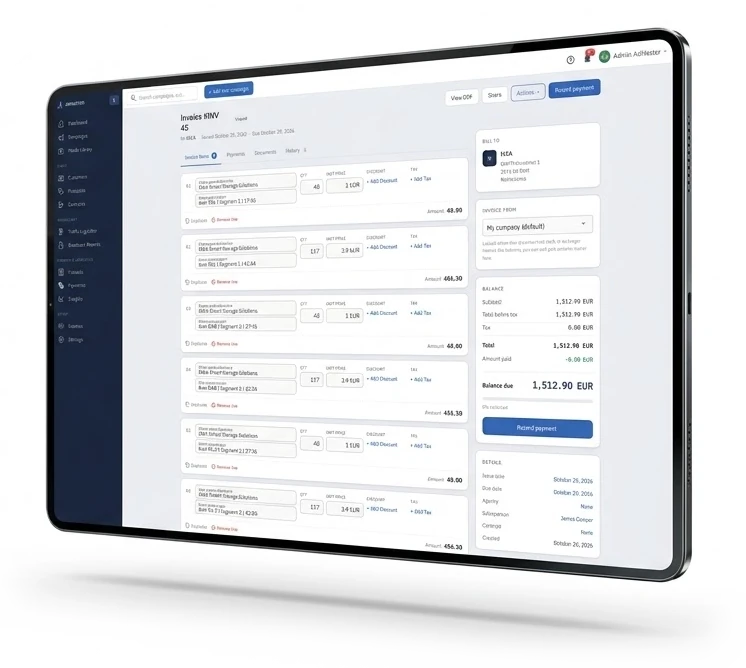
An AdMaster invoice on a tablet: one line for each station in the campaign, with plays, unit price, discount and tax, and the invoice totals

Enter the order once.

The proposal, the contract, the schedule and the invoice all come from the same campaign. Nobody types the same order three times, and the numbers on the invoice match the numbers in the traffic log.

How billing works

Pick the steps you need.

The simplest way is a campaign and an invoice. The full way runs from a proposal signed online to the last invoice. Only need the schedule? That works too: AdMaster never asks for a proposal or a contract, and a customer needs just a name and a type of business.

  1. Proposal
  2. Accepted
  3. Contract
  4. Signed
  5. Campaign
  6. Aired
  7. Report
  8. Invoice

Enter the campaign. Invoice it when it airs.

Enter the campaign: AdMaster schedules it and sends the traffic log to your playout. After it airs, create the invoice from the campaign, with the spots that aired or the spots you planned, and change any line before you send it. For many stations, this is all they need.

At the end of the month, one billing run invoices every campaign that aired. Or ask your AI assistant: "Create the invoices for last month." Billing runs

1. Proposals

One proposal for everything you sell.

Build the proposal the way the campaign will run, and add as many other items as you sell: spot production, sponsorships, web advertising. When the client agrees, there is nothing to enter again.

Priced the way you sell

Set the price for each part of the campaign: per play, per second, per day, per week, per month or a flat fee. AdMaster calculates the value for every station in the campaign.

Signed online, or a PDF

Send the client a link, where they accept and sign the proposal online, or decline it. Or send a PDF with your logo. Both show the date it is valid until, 30 days from the proposal date unless you change it.

Yes means on air

When the client signs, activate the campaign. It can be on air in the next hour, if your playout loads new traffic logs every hour.

2. Contracts

Contracted. Scheduled. Aired.

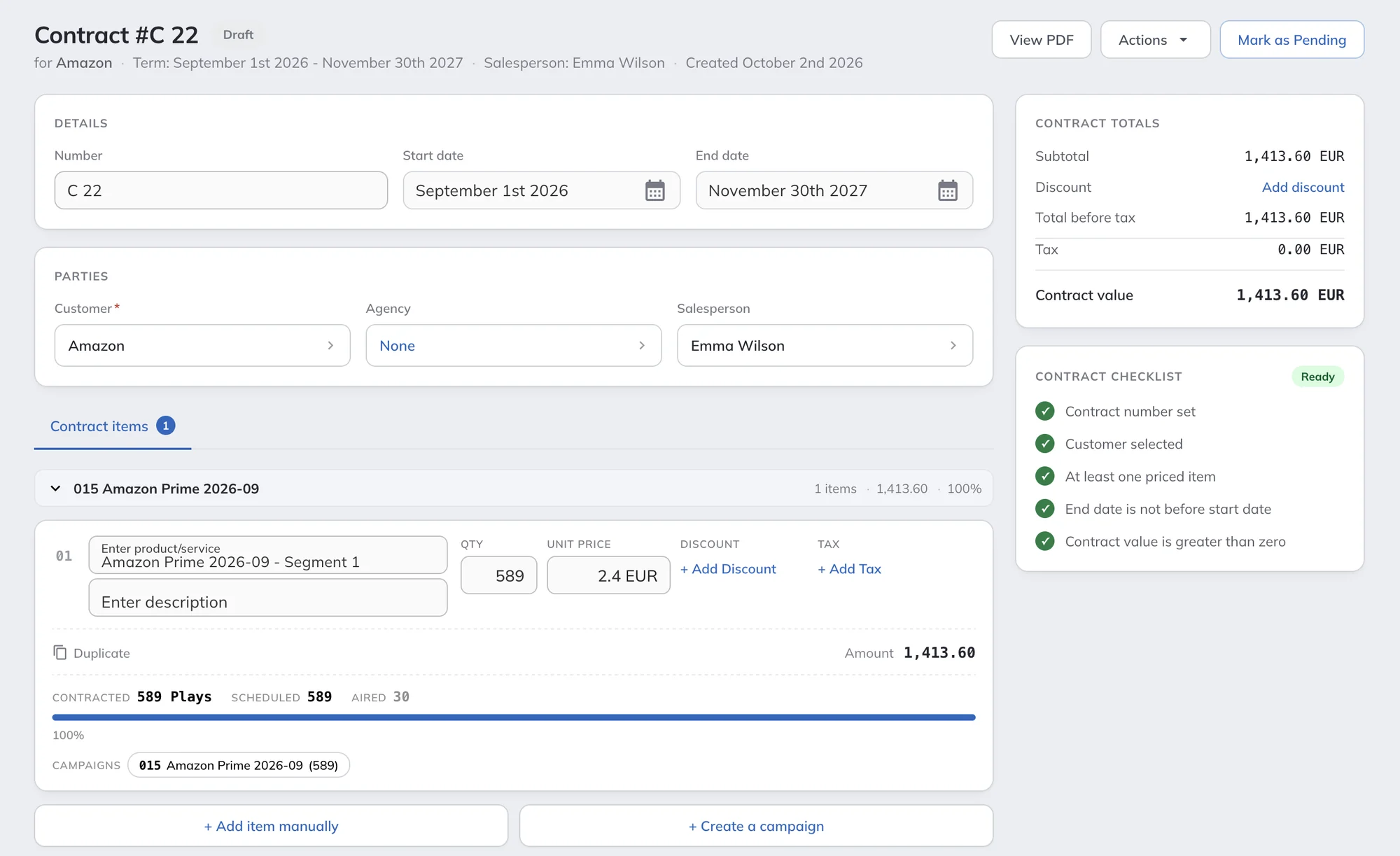
Turn an accepted proposal into a contract, or start a new one. A contract holds the whole deal: the customer, the agency, the salesperson and the term, from one month to many years. Each item has a quantity, a unit price, and its own discount and tax.

Link a contract to one or more campaigns, or create the campaign straight from the contract. AdMaster then shows the contracted, scheduled and aired plays for every item, so you know what is left to deliver before you invoice.

A checklist tells you when the contract is ready: number, customer, at least one priced item, the dates and the value. Send it as a link the client signs online, or open it as a PDF.

AdMaster contract: customer, agency and salesperson, the contract term, an item with contracted, scheduled and aired plays, the linked campaign, the contract value and the contract checklist

Electronic signature

Sent as a link. Signed online.

Send a proposal or a contract as a link. Your client reads it, accepts it and signs it in the browser, on a computer or a phone, with no account and no app. Proposals and contracts are signed the same way.

  1. 1

    Open the link

    The client opens the link, sees the proposal or the contract and clicks Accept & Sign.

  2. 2

    Read the terms

    Your terms and conditions open, and the client scrolls to the end before going on.

  3. 3

    Sign

    The client enters name, job title, company and email, picks one of three handwritten styles for the name, ticks the box and signs.

  4. 4

    Signed

    The proposal is accepted and locked. The client gets the signed PDF by email, and your salesperson gets a notice.

A record of every signature

AdMaster keeps the time of signing, the IP address and a copy of the terms and conditions the client accepted.

Declined, with a reason

The client can also decline the proposal and write why, so your salesperson knows what to change in the next offer.

No printing, no scanning

Nothing to print, sign by hand, scan and send back. The client signs in any browser, in a few clicks.

3. Invoices

Every invoice, your way.

AdMaster builds the invoice from a campaign or from a broadcast report, with one line for each station. Then it is yours to change: edit any line, add lines by hand, or build an invoice from scratch, line by line.

Invoices can hold anything you sell. Spot production, talent fees, flat sponsorship fees and digital packages go on as lines of their own.

Start from

  • A campaign, with the spots that aired
  • A campaign, with the spots you planned
  • Every campaign of the month, in one billing run
  • A broadcast report
  • A blank invoice, line by line

Change anything

  • Quantity, price and tax on any line
  • A discount on any line, or on the whole invoice
  • More than one campaign on one invoice
  • A due date for each invoice

Send it out

  • A PDF with your logo and your labels
  • Sent to your customer from AdMaster
  • Exported to CSV, JSON or XML
  • 4As electronic invoice files for agencies

Agencies see their discount.

Give each agency and each customer a default discount. It goes on every invoice you create from their campaigns, and you can add one more discount to any single invoice. The PDF shows the gross amount, every discount and the net amount, so nobody has to ask if the discount was there.

Billing runs

The whole month, invoiced in one go.

At the end of the month, AdMaster finds every campaign that aired, creates one invoice for each, issues the invoices and emails them to your customers. You check the list before anything is sent.

Faster still: one message.

Tell your AI assistant: "Create the invoices for last month." It prepares one invoice for each campaign and shows you every invoice and the total before anything is saved. The invoices are saved as drafts, and your team issues and sends them. Beta. AI can make mistakes. Always have a person check everything your AI assistant does. How AI assistants work.

  1. 1

    Choose the period

    Last month, last broadcast month, last week or any dates you choose. Set the issue date, and choose which spots to invoice: only the ones your broadcast log confirms, confirmed spots plus scheduled ones where there is no log, or every scheduled spot. Payment terms come from each customer.

  2. 2

    Check the campaigns

    Every campaign with spots aired in the period, with its customer, stations, spots and amount. Leave out any campaign with one click.

  3. 3

    Create & send

    AdMaster issues the invoices, numbers them and emails each one to the customer's billing contact.

Checked before it goes out.

AdMaster flags customers without a billing email, campaigns with no amount and campaigns already invoiced for the period. Warnings never stop the run: you decide what goes in.

Proof with the bill, if you want it.

Tick one box, and a broadcast report goes with every invoice. AdMaster builds it from the spots each campaign aired in the period, so the advertiser sees what they pay for.

Every run on record.

The Billing runs tab keeps each run: when it ran, the billing period, who ran it, how many invoices and the gross total.

For agencies in the US

4As electronic invoices, ready to upload.

Many agencies in the US ask for invoices in the 4As electronic format. AdMaster creates the files straight from your invoice list, so nobody retypes an invoice in another program.

Every aired spot goes on its own line, with its date, time, length and rate. Flat and monthly fees, such as talent fees, get lines of their own. Select invoices from all your stations and export them in one go.

Your documents

Your companies. Your labels. Your currency.

Issuers

One account, more than one company? Each station's proposals, contracts and invoices can come from a different company, with its own name, address and logo.

Logo and labels

Your logo and address on every PDF. Rename the labels on your documents, for example "Net amount" instead of "Subtotal before tax".

Customer details

Billing address, tax ID and business ID, four custom fields for what your local rules ask for, and a message that prints on every invoice for that customer.

Currency and tax

Set your currency and your taxes once. A customer who pays in another currency can have their own.

Due dates

Set a default due date for each customer, or a due date for a single invoice.

The right people

Sales, traffic and accounting work in one account, with unlimited users. Each role decides what a user sees. Salespeople can see only their own invoices.

Accounting

AdMaster bills. Your accounting software books.

AdMaster is traffic software, with the billing your traffic work needs. Bookkeeping, banking and e-invoicing to your tax authority stay in your accounting software, which follows the rules of your country.

Payments are part of AdMaster. Record each payment by hand, and you always see which invoices are paid, partly paid or overdue, and how much each customer owes. AdMaster does not connect to your bank account or to other apps, so nothing changes without your team.

Export your invoices to CSV, JSON or XML and import them there. For agencies in the US, export 4As electronic invoices.

Need more?

Credit notes, a connection to your CRM, accounting or other software, or your data on your own server? We build custom versions of AdMaster. Tell us what you need

No one for traffic and billing?

Our team at IT4RADIO schedules your traffic in AdMaster for you, remotely, for a flat monthly fee. We can prepare your invoices too.

Ask IT4RADIO

Billing questions

No. They are included in the price, ready when you need them. A campaign goes on air without a proposal or a contract, and a customer needs just a name and a type of business.

Yes. Send the proposal or the contract as a link. The client reads your terms and conditions, signs in the browser and gets the signed PDF by email, and your salesperson gets a notice. The client can also decline, with a reason.

AdMaster records who signed, when, from which IP address and which terms and conditions they accepted. Whether that is enough for a contract depends on the law in your country. If some of your contracts need another kind of signature, use it for those contracts.

Yes. Create the invoice from the spots that aired, or from the spots you planned. Either way, you can change every line before you send it.

Yes. Click Run billing in Invoices and choose the period. AdMaster creates one invoice for each campaign that aired, issues the invoices and emails them to your customers, with a broadcast report if you want one. Before anything is sent, it flags campaigns already invoiced for the period, campaigns with no amount and customers without a billing email. You can also ask your AI assistant: "Create the invoices for last month." AI can make mistakes. Always have a person check everything your AI assistant does.

Yes. Add spot production, talent fees, a flat sponsorship fee, a digital package or anything else you sell as a line of its own. AdMaster does not track or reconcile these lines, because they never go on air.

Yes. A campaign on more than one station gets one line for each station, and you can add more campaigns to the same invoice.

Set a default discount on the agency, and on any customer. AdMaster puts it on the invoices you create from their campaigns. You can also add a discount to a single invoice. The PDF shows the gross amount, every discount and the net amount.

Invoices export to CSV, JSON or XML for your accounting software. For agencies that ask for electronic invoices, AdMaster also creates 4As files, with every aired spot and every flat fee on its own line.

Yes. Export them from your invoice list for the agencies that ask for them. Every aired spot is on its own line with its date, time, length and rate, and flat fees such as talent fees get lines of their own.

AdMaster is traffic software. It creates proposals, contracts and invoices and sends them to your customers, but it is not designed to replace accounting software or e-invoicing connected to banks or tax authorities. Export your invoices to CSV, JSON or XML and import them into your accounting software.

Yes. Record each payment in AdMaster, on the invoice or in Payments. AdMaster then marks the invoice as paid or partly paid, shows the overdue ones and keeps the balance of each customer. It does not connect to your bank account or to other apps, so a payment status changes only when someone on your team records the payment.

Only if you want them to. Each user's role decides what they see and change. Salespeople can be limited to their own invoices.

Yes. Your account has its own currency, and any customer can have a different one.

No. Proposals, contracts and invoices are included in every licence, with unlimited users. See pricing.

From proposal to invoice, in one place.

Start the 60-day free trial, with no credit card. Put real spots on air from day one.

Questions?

support@admaster.info

Live chat on working days, 9:00 to 21:00 CET, when an agent is available.