Station networks and split ads

The smartest split ads you have ever seen.

Schedule every station, channel and frequency from one account. AdMaster keeps split ad breaks the same length on every frequency and syncs them in real time, as fast as your playout can load the new traffic logs.

Or try AdMaster free for 60 days, with no credit card.
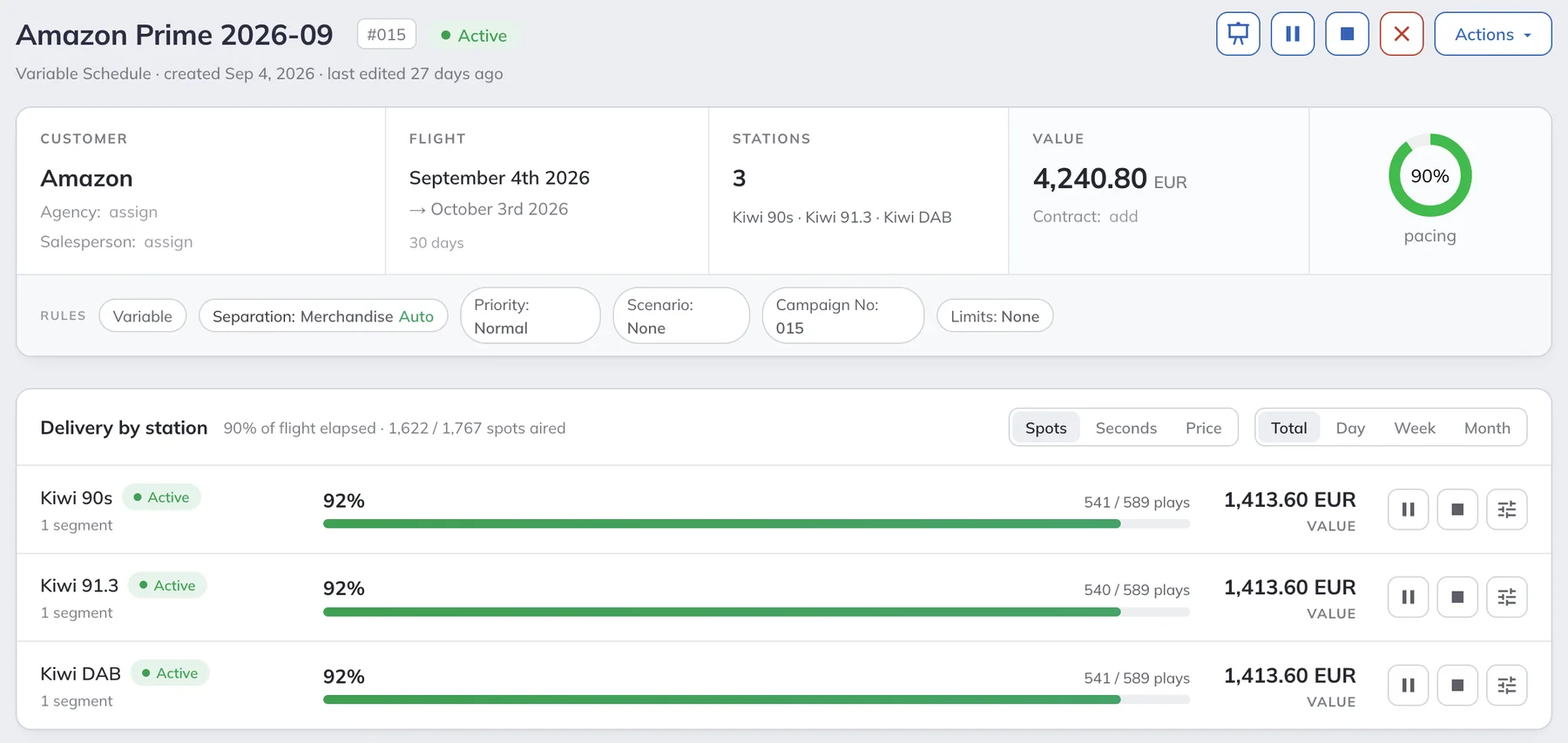
One AdMaster campaign on three stations, with plays, delivery and value for each station

Sold today. On air in the next hour.

Two hours after saying yes, an advertiser's ad can run on Instagram. A station can't answer with "let me check what will be available in three months". With AdMaster, a new campaign airs across your whole network in the very next hour, if your playout updates its traffic log every hour.

How many licences do you need?

You need one licence for each traffic log. Find your setup below.

1 licence per station

Different stations

Each station airs its own program and its own commercials, so each station has its own traffic log. Five stations need five licences.

1 licence

One program, the same commercials on every frequency

Every frequency airs the same commercials at the same time. One traffic log feeds them all, so you need one licence, no matter how many frequencies you have.

1 licence per frequency

One program, different commercials on each frequency

These are split ads: each frequency airs its own commercials in the same break. Each frequency gets its own traffic log. Five frequencies need five licences.

More than one licence? You get the multi-station discount: the more licences you have, the less you pay for each one. Every licence includes unlimited users. Get your network price

One account

Schedule once for the whole network.

Your whole network runs in one AdMaster account. Inside it, every person on your team gets their own user account: sales, traffic and accounting staff at every station, with no limit and no fee per user. Everyone works from any web browser. Each station keeps its own settings. AdMaster does the rest.

Choose the stations for each campaign

Run a campaign on one station, on a few or on the whole network, with the same schedule everywhere or a different one for each station. You see the plays, delivery and value for every station on one screen.

A traffic log for every playout

Each station gets its own traffic log, in the format its playout reads. Stations in one network can use different playout systems.

Own breaks, own local time

Each station keeps its own breaks and its own time zone. Save complex clocks once as a clock set, for example two breaks per hour on Mondays and three on Tuesdays, and share it with other stations. Change the shared clock set once, and every station that uses it follows.

On air in the next hour

A salesperson in one city adds a campaign. If your playout updates the traffic log automatically every hour, a station in another city airs the new campaign in the very next hour.

The whole team in one place

Sales, traffic and accounting staff from every station work in the same account. Each user has a role that decides what they can see and change.

Checked on every station

AdMaster compares what aired on each station with its schedule. Advertisers follow their campaign in one live report for all your stations.

Split ads

Different commercials. Same break length.

With split ads, the same break gets a different length on each frequency. But the network program must start again at the same moment everywhere.

AdMaster keeps your breaks the same length on every frequency, in real time. Choose how it works for your network.

Follow the leading station

Choose one station as the leader. The breaks on all other stations get the same length as the leader's breaks.

Match the longest break

At every break time, all stations in the group get the length of the longest break in the group.

Each station on its own

No sync. Each station uses its own break limits, such as a maximum break length or a maximum number of spots.

Top-ups fill the shorter breaks.

When a local campaign makes a break longer on one frequency, AdMaster tops up the same break on the other frequencies, at once and automatically.

Example: at 8:15, every frequency airs the same two national spots. A local shop buys a 30-second spot on your north frequency only. AdMaster adds 30 seconds of top-ups to the 8:15 break on your other frequencies, and the network program starts at the same second on all of them.

Own jingles on every frequency.

Each station can open and close its breaks with its own jingles. AdMaster puts them in the break, so your playout has less to do for split ads.

Same commercials on every frequency? Then you don't need split ads. One traffic log feeds all your frequencies, for one licence.

Top-ups

Every break exactly as long as you need.

Top-ups have one goal: a break of exactly the length you need. AdMaster decides what to use. It puts break length first, and it still keeps the same spot and competing spots apart.

Choose the top-ups for each break

For every break, choose what may top it up: your own files, such as station promos, and spots from active campaigns. When a break needs to be longer, AdMaster adds extra plays of those spots automatically.

Allow a spot as a top-up

Tick one box in the spot settings, for each station. This only allows AdMaster to use the spot. Whether it is used depends on your break lengths, your paid spots, the campaign settings and the scheduling.

Top-ups follow the campaign times

A spot tops up breaks only on the days and hours it has in its campaign. Example: a campaign airs a spot 5 times in the morning, as paid plays. Add the afternoon with 0 plays, and the same spot, or other spots, can top up breaks in the afternoon only.

Used only when a break needs it

You don't set a number of top-ups, such as twice a day or up to three extra plays. A spot that runs once at any time from 0 to 24 h can top up at any time. A spot with 0 plays on Thursdays from 10 to 12 h can top up only then.

Your playout can't run split ads?

Our team at IT4RADIO has set up split ads for many stations that thought it was impossible, with little or no new hardware and software. Ask us about your setup.

Ask IT4RADIO

Network questions

You need one licence for each traffic log. Every station that airs its own commercials has its own traffic log, so five stations need five licences. A station that airs the same program and the same commercials on more than one frequency uses one traffic log and needs one licence, no matter how many frequencies it has.

When each frequency airs its own commercials, each frequency needs its own traffic log and its own licence. A station with five frequencies and split ads needs five licences, at a network price with the multi-station discount. You run all of them from one AdMaster account.

The price per licence goes down as the number of licences goes up. Every licence includes every feature, unlimited users, free updates and free support, with no setup fee. Send us the number of stations and frequencies and the playout you use, and we reply with your network price. Ask for your network price.

Yes. Choose the stations when you create the campaign: one, a few or all of them. The campaign can air on the same schedule on every station, or on a different schedule for each station, for example 5 plays a day on one station and 3 in the morning only on another. AdMaster schedules the campaign on each station and adds it to each station's traffic log. On the campaign page you see the plays, delivery and value for every station.

Group your stations and choose how their breaks stay in sync: all stations follow the break length of a leading station, or all stations match the longest break in the group. When one break gets longer, AdMaster tops up the same break on the other stations with the top-ups you chose for that break: your own files, such as station promos, or spots from active campaigns.

Yes. Each station has its own traffic log format and its own local time. AdMaster creates traffic logs for 40+ radio and TV playout systems, and you can build any other format in AdMaster. See all playout systems.

Top-ups have one goal: a break of exactly the length you need. So you don't set a number of top-ups, such as twice a day, or 5 paid plays plus up to 3 top-ups. You choose where a spot may top up: AdMaster uses it only on the days and hours it has in its campaign, and only when a break needs it. For example, a campaign can air a spot 5 times in the morning as paid plays, and use the same spot as a top-up in the afternoon only.

Contact our team at IT4RADIO. We have set up split ads for many stations that thought it was impossible, with little or no new hardware and software. Each station can also open and close its breaks with its own jingles in AdMaster, so your playout has less to do. Ask IT4RADIO about your setup.

AdMaster exports invoices to CSV, JSON or XML for your accounting software. For a direct connection with your CRM, accounting or website, we build a custom version of AdMaster for your network. It runs on its own dedicated server. Tell us what you need.

Yes. Our team at IT4RADIO schedules your traffic in AdMaster for a flat monthly fee. Visit IT4RADIO.

Get your network price.

Tell us how many stations and frequencies you run, which playout you use and whether you run split ads. We reply by email with your price and answer your questions.

Prefer to write?

support@admaster.info

Live chat on working days, 9:00 to 21:00 CET, when an agent is available.

Ask for your network price

We use these details to work out your price.

Name
Email
Station or network
Country
Number of stations, channels and frequencies
Playout system
Do you run split ads?
Yes
No
Not sure yet
Message

We use your details only to answer you. Privacy Policy