Traffic logs

Traffic logs for the playout you already have.

AdMaster writes the traffic log in the format your playout reads, for more than 40 radio and TV playout systems, plus m3u and pls. Find your playout below. If it's not on the list, build your own log format in AdMaster.

AdMaster output format list: choose the traffic log format your playout reads

Radio

TV

  • Amagi
  • Darim FS4000
  • Dinesat Movie
  • Masterplay
  • Softron
  • Stream-Labs VPlay
  • TVU Channel

Music schedulers

Standard playlists, for any other system

Names in blue have a setup note on this page.
How it works

From AdMaster to your playout, automatically.

AdMaster does not reach into the core of your playout system. It delivers a list of what to play and when, with the spot files. Your playout reads them from a folder, like any other playlist.

  1. 1

    Choose the format

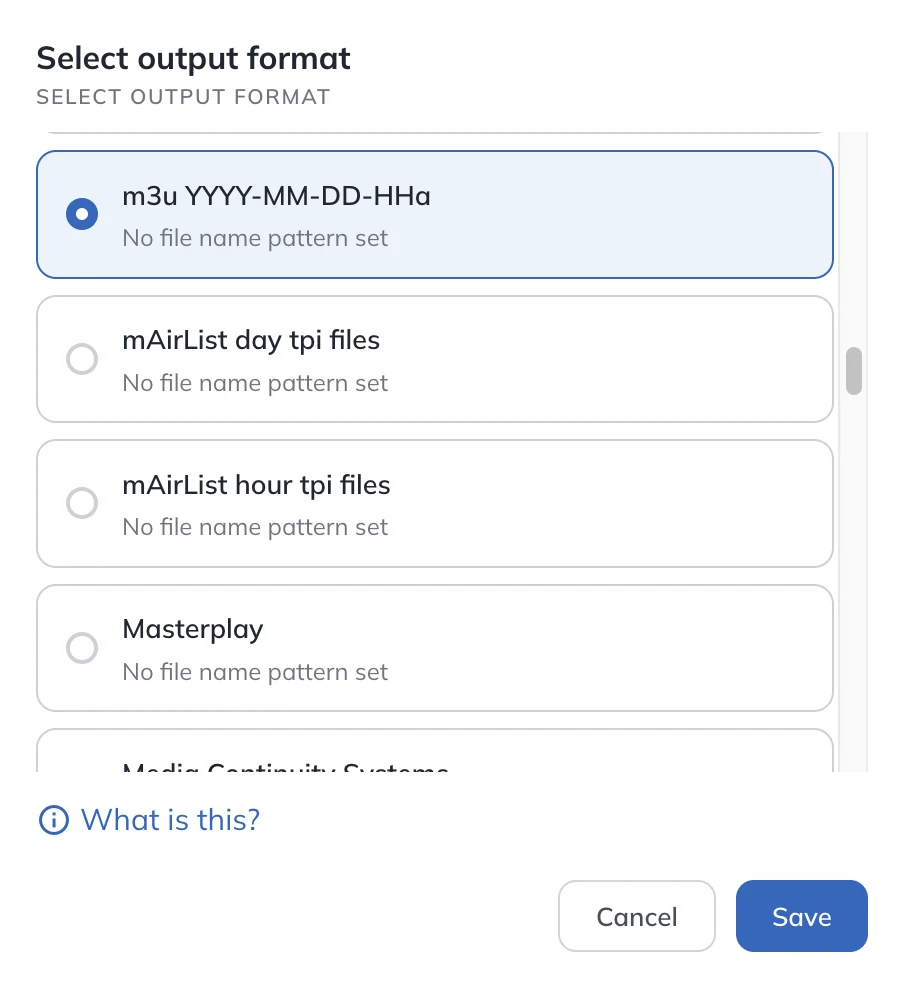
    In AdMaster, choose the output format your playout reads. Then tell your playout which folder to read the traffic logs from.

  2. 2

    The app delivers

    The AdMaster Desktop Client app on your playout computer downloads every new traffic log and spot file into that folder, like a tiny Dropbox. You copy nothing by hand.

  3. 3

    On air

    Your playout plays the breaks and writes its broadcast log. The app sends the log back to AdMaster, which checks what aired. How reconciliation works

Every change airs from the next hour.

AdMaster builds the traffic log again after every change to a campaign, spot or break, and the app picks it up within minutes. A change airs from the next hour at the earliest, never in the hour already on air: no one can guarantee that a playout reloads the playlist of the hour it is playing. If your playout loads the traffic log every hour, a campaign sold now airs in the next hour.

Setup notes

Notes for some playouts.

Most playouts need only the right output format and folder. These need one more step, or have a choice to make.

Radio

Audisi GML

Build the traffic log in the output configurator, as a custom output format.

Radio

mAirList

AdMaster writes TPI files. Choose one file per day or one file per hour. A step-by-step video is on the Video tutorials page.

Radio

Myriad

There are two output formats: one for Myriad 6, and one for Myriad 5 and earlier. Choose the one for your version.

Radio

Play It Live

Use the Insert External Log/Playlist dialog with these settings:

  • Date pattern: %yyyy%-%MM%-%dd%-%HH%a
  • Format: M3U Playlist
  • Position: To Play Next

The letter a stands for the first break in the hour. For the second, third and later breaks, use b, c and so on.

Radio

RadioDJ

Use the m3u output for newer versions of RadioDJ, and the rpl output for older versions. Both are ready in AdMaster. For more information, look on the RadioDJ forums.

Radio

Rivendell

Rivendell runs on Linux, and the AdMaster Desktop Client app runs on Windows. Install the app on any Windows computer and keep its folders in sync with the Rivendell computer, through a shared network folder or a file-sharing service that works on both systems.

Radio

StationPlaylist

StationPlaylist offers two ways to import traffic logs. We recommend the m3u output format in AdMaster, with Play a File break notes in StationPlaylist. A step-by-step video is on the Video tutorials page.

Radio

Zara Studio

AdMaster writes seq files for Zara Studio.

TV

Softron

Softron runs on a Mac, and the AdMaster Desktop Client app runs on Windows. Install the app on any Windows computer and keep its folders in sync with the Mac, through a shared network folder or a file-sharing service that works on Windows and Mac.

Music scheduler

MusicMaster and PowerGold

These are music schedulers, not playouts. They merge the AdMaster traffic log into the music log, and your playout airs the merged log. See the merge method below.

Playlist format

m3u and pls

Standard playlist formats that most playouts can read. Choose one of three file name patterns, to match what your playout looks for.

Radio

RCS Zetta

  • In AdMaster: the Zetta output format
  • In Zetta: import the log as a V15native traffic flat file
  • A Spot File ID on every spot: Zetta reads it as the External ID

With Zetta's Auto Load, the spot audio the app delivers attaches to the carts the log creates. AdMaster can name each audio file after its Spot File ID, so Auto Load finds it. A step-by-step video is on the Video tutorials page.

Two ways to air commercials

How does your playout take the breaks?

This depends on how your playout is built, not on AdMaster. Ask your playout's support team which way it works, so you know what to expect.

Event

The playout loads each break when it comes.

Your program log has no commercials in it, only a marker for each break. When the playout reaches the marker, it loads the break from the AdMaster traffic log.

Good: every change in AdMaster airs from the next hour, with no reload by hand.

Keep in mind: your program log doesn't know in advance how long each break will be. AdMaster can make every break exactly as long as you need, with top-ups.

Merge

The breaks go into the program log in advance.

Your playout or music scheduler merges the AdMaster traffic log with the music log into one playlist, for the day or longer.

Good: timing exact to the second, and you see the whole day in advance.

Keep in mind: after a change in AdMaster, merge and load the playlist again, or the change does not air. Some playouts can reload it automatically.

Not on the list?

Build your own log format.

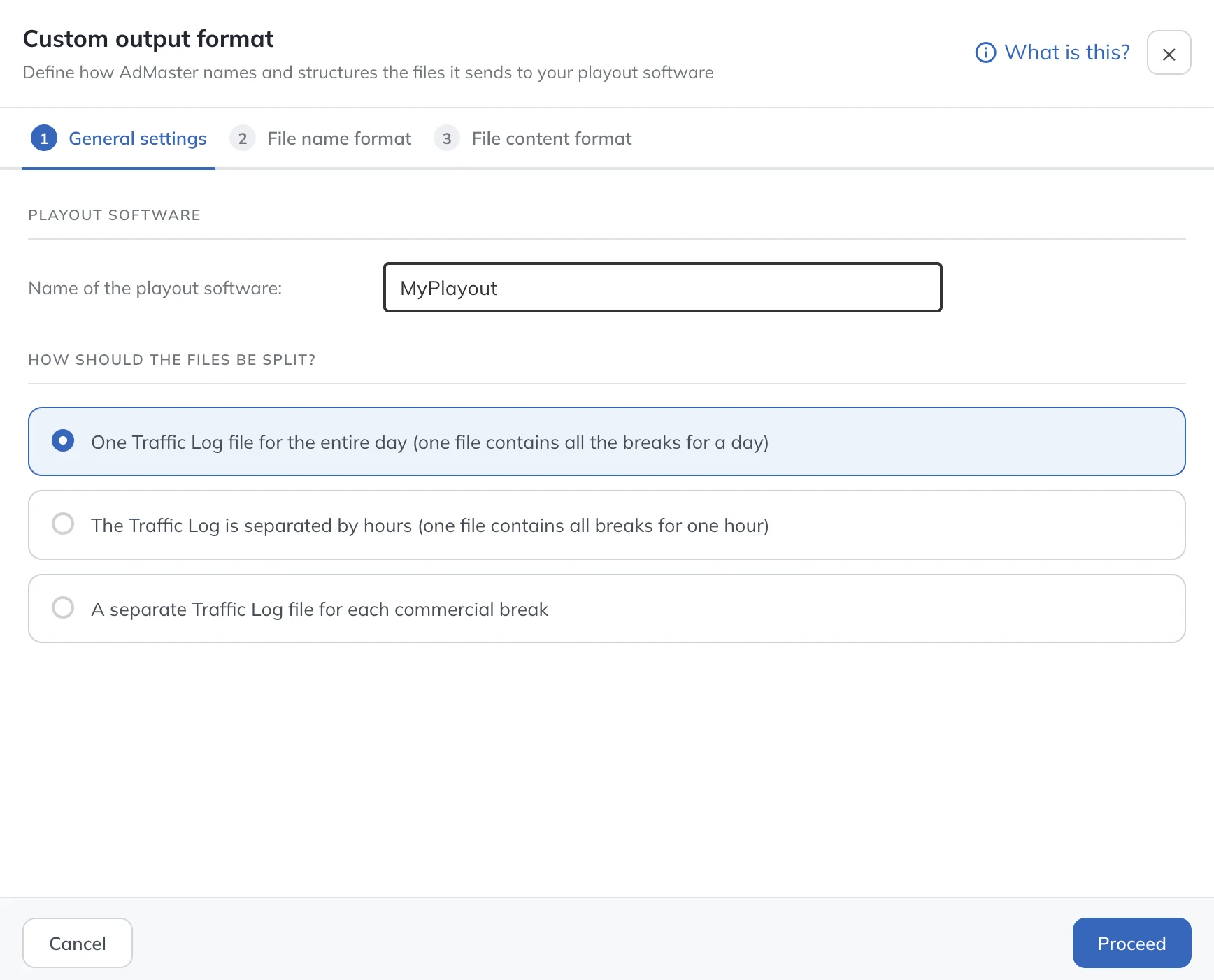
Most playouts can read an m3u or pls playlist. If yours needs something else, build the format yourself: in General Station Settings, choose Add a new output format. In three steps you choose one file per day, per hour or per commercial break, then the file name, then what goes into the file.

Any playout that can import a traffic log, or at least a simple playlist generated in other software, can work with AdMaster.

Or send a sample of the log your playout reads to support@admaster.info. We are always ready to add a new format.

Ask about your playout
Custom output format in AdMaster: name the playout, then choose one traffic log file per day, per hour or per commercial break

Traffic log questions

If your playout can import a traffic log, or at least a simple playlist generated in other software, AdMaster can work with it. AdMaster has ready-made formats for more than 40 radio and TV playouts, plus m3u and pls, and you can build any other format in the output configurator. Test it with your own spots during the 60-day free trial.

Only the AdMaster Desktop Client app, and only when you are ready to go on air. It runs on Windows. It downloads the traffic logs and spot files into the folders your playout reads, and sends the broadcast log back to AdMaster for reconciliation.

Yes. AdMaster runs in any web browser. Install the AdMaster Desktop Client app on a Windows computer, and keep its folders in sync with the playout computer through a shared network folder or a file-sharing service that works on both systems.

AdMaster builds the traffic log again after every change to a campaign, spot or break, and the app picks it up within minutes. The Calendar in the Traffic Log Editor shows when each day's traffic log was sent and when your station downloaded it. A change airs from the next hour at the earliest, never in the hour already on air, because no one can guarantee that a playout reloads the playlist of the hour it is playing. If your playout merges the log into the music log in advance, merge and load it again.

Try m3u or pls first: most playouts can read them. If your playout needs a different layout, build it in the output configurator, in General Station Settings. Or send a sample of the log your playout reads to support@admaster.info, and we add the format.

Yes. Each station has its own traffic log format and its own local time. Station networks and split ads

Yes, if your playout writes a broadcast log with one line for every spot, the spot name, file name or cart number, and the time with seconds. The check runs in real time only if your playout updates its log as it plays. How reconciliation works

No. AdMaster is not affiliated with or endorsed by the makers of these systems. We name them only to show interoperability: which file formats AdMaster can write for them. Playout makers update their software, so test every new version with your own spots before you go on air.

All product names are trademarks of their owners. They are named here only to show compatibility and do not imply endorsement. AdMaster writes these formats only for interoperability, using the file formats each playout accepts from other software, without reverse engineering. We help with every integration as well as we can, but we can't guarantee that every playout version works without problems.

Test it with your own playout.

Start the 60-day free trial, with no credit card. Put real spots on air from day one.

Questions about your playout?

support@admaster.info

Live chat on working days, 9:00 to 21:00 CET, when an agent is available.